 Year   Value
 ----   -----
 0      1000.0
 1      1015.0
 2      1030.22
 3      1045.68
 4      1061.36
 5      1077.28
 6      1093.44
 7      1109.84
 8      1126.49
 9      1143.39
Remember the
round function? Hint: This program is only 5-6
lines long.
surf. Write a Python
statement that will print the value of the red component at coordinate
(50,99).
surf. Write a Python
statement that will set the value of the red component at coordinate
(50,99) to zero.
x = input("enter int: ")
d = 2
p = True

while p and d < x:
    if x % d == 0:
        p = False

    d = d + 1

if p:
    print "yes"
else:
    print "no"
makeBlurry that takes an image (surface) as its
only parameter and animates displaying the image
with random colors at random locations within the picture. One way to do this
is to go through every pixel and toss a coin on whether you should change it to
a random color or not.
Another technique is to randomly generate pixel coordinates and change them.

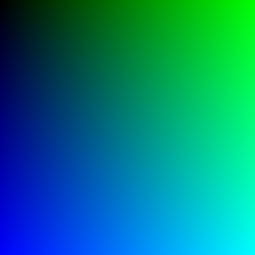
image.png.
Write a Python program that generates the 256x256 image below. The upper
right color is all green and the lower left image is all blue. Upper left is
all black and lower right is teal, which is the color
(0,255,255).
(x1,y1) to point
(x2,y2)
in a Pygame window. Write a short Python code segment that draws a small
red circle
with radius 5 at the mid-point on the line.
brighten that makes an image brighter by a
percentage passed to it. For example brighten(pic,.10); will brighten
pic by ten percent. What you have to watch out for is
having one of the color values become greater than 255.
If a number becomes greater than 255 you should have it max out at 255.
for y in range(3):
   for x in range(y,4):
       print y+x,
   print