totalRed that takes a parameter
pic and computes and returns the total of the red values
that are even in pic. Run your function on the
image bug.jpg
and print that total to the terminal (use a print statement).
import pygame

# Compute the total amount of redness in an image
# for the red values that are even
def totalRed(pic):
    total = 0
    for y in range(pic.get_height()):
        for x in range(pic.get_width()):
            color = pic.get_at((x,y))
            if color.r % 2 == 0:
                total = total + color.r

    return total

# m a i n   p r o g r a m
pygame.init()
win = pygame.display.set_mode((1,1))
basedir = "/home/ehar/t/Harcourt/gallery/"
file = basedir + "bug.jpg"
pic = pygame.image.load(file).convert()
print "Total red is", totalRed(pic)
pygame.quit()
skulls.jpg
and wave.jpg.
import pygame

# Compute the average luminosity of an image
def avg_luminosity(pic):
    total = 0
    for y in range(pic.get_height()):
        for x in range(pic.get_width()):
            color = pic.get_at((x,y))
            total = total + color.r + color.g + color.b

    return float(total)/(pic.get_width() * pic.get_height())

# m a i n   p r o g r a m
pygame.init()
win = pygame.display.set_mode((1,1))
basedir = "/home/stlawu/ehar/t/Harcourt/gallery/"

# compare the luminosity of the two images below
file1 = basedir + "skulls.jpg"
file2 = basedir + "wave.jpg"
pic1 = pygame.image.load(file1)
pic2 = pygame.image.load(file2)

print "----------------------------------------------------------------"
print
print "The luminosity of", file1, "is", round(avg_luminosity(pic1),1)
print
print "The luminosity of", file2, "is", round(avg_luminosity(pic2), 1)
print
print "----------------------------------------------------------------"
pygame.quit()
image1.jpg and image2.jpg
and that image1.jpg is smaller in both width and height
than image2.jpg.
Write a python program that creates a new image by centering
image1.jpg inside of image2.jpg.
For example, in the image below comic.jpg is centered in
bug.jpg.
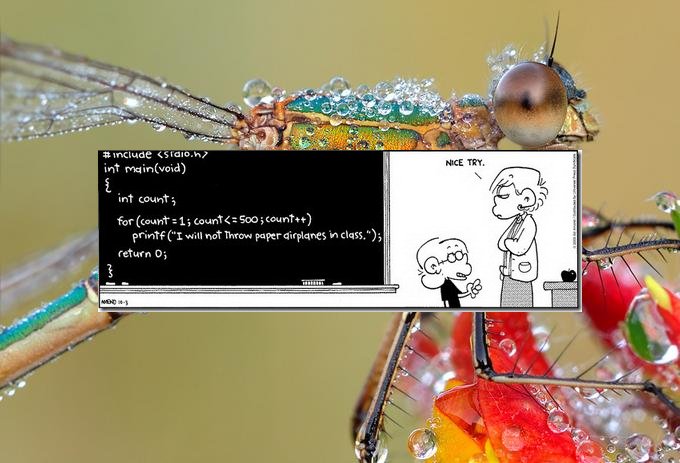
blit function.
import pygame

# This program centers one image inside
# another.
base = "/home/ehar/t/Harcourt/gallery/"
image1 = base + "comic.jpg"
image2 = base + "bug.jpg"
pic1 = pygame.image.load(image1)
pic2 = pygame.image.load(image2)

# get the width and height of the images
wpic1 = pic1.get_width()
hpic1 = pic1.get_height()
wpic2 = pic2.get_width()
hpic2 = pic2.get_height()

win=pygame.display.set_mode((wpic2,hpic2))

# blit the first image in the second
pic2.blit(pic1, ((wpic2-wpic1)/2, (hpic2-hpic1)/2))

# now put the result on the display window
win.blit(pic2, (0,0))
pygame.display.update()
raw_input("hit enter")
pygame.quit()
Prints I will not throw paper airlpanes in class 500 times.