CS 140 - Test 2 Study Guide
Make sure review the homework assignments, all of the labs we've done, and
the examples we've written in class.
-
Write a method named
makeBlurry that animates filling in a picture with random colors at random locations within the picture. One way to do this
is to go through every pixel and toss a coin on whether you should change it or not.
  String path = "T:/Harcourt/Fall2008/CS140/gallery/";
  Picture pic = new Picture(path + "bug.jpg");
  makeBlurry(pic);
  pic.repaint();

-
Write a method
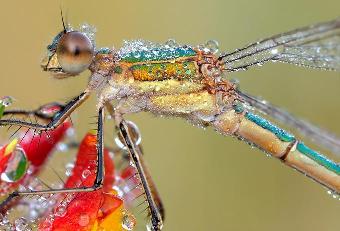
flipHorizontal that flips a picture horizontally.
For example, here is the bug flipped horizontally. (Contrast this with the original.)
-
Write a method
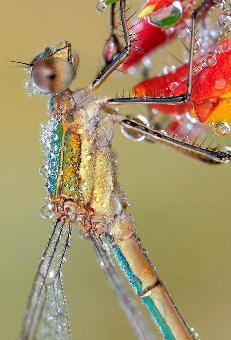
rotateLeft that rotates a picture
ninety degrees counter clockwise.
For example, here is the bug rotated left. (Contrast this with the original)
-
Make sure all of your methods from class and the labs are in your
Picture.java file and work properly so you can use them.
-
Review the clock program.
-
Review the steganography programs used for encrypting and decrypting
messages.
-
Write a method
brighten that makes a picture brighter by a percentage passed to it. For example brighten(pic,.1); will brighten
pic by ten percent. To brighten a picture simply increase all three
red, green, and blue values by the same amount. What you have to watch out for is
having one of the color values become greater than 255. If a number becomes greater than 255 you should have it max out at 255.
-
Review the
copyInto, enlarge, grayscale, decreaseRed, and shrink methods.